初识Kafka
基本介绍
官网:https://kafka.apache.org/
- Apache Kafka is an open-source distributed event streaming platform。
- Kafka是基于zookeeper的分布式消息系统。
- Kafka具有高吞吐量、高性能、实时性及高可靠等特点。
基本概念
Topic:一个虚拟概念,由1到多个Partition组成。Partition:实际消息存储单位。Producer:消息生产者。Consumer:消息消费者。
Kafka安装
安装文件:
jdk-8u181-linux-x64.tar.gz
apache-zookeeper-3.5.7-bin.tar.gz
kafka_2.11-2.4.0.tgz
安装JDK
在~/.bashrc文件中增加如下内容,然后执行source ~/.bashrc命令。
export JAVA_HOME=<path>/jdk1.8.0_181
export PATH=$PATH:$JAVA_HOME/bin

安装zookeeper
zookeeper默认配置文件是zoo.cfg,进入conf目录,将zoo_sample.cfg复制一份命名为zoo.cfg。
进入bin目录,执行./zkServer.sh start命令启动zookeeper。

安装Kafka
修改config/server.properties文件如下内容。
listeners=PLAINTEXT://192.168.31.114:9092
dvertised.listeners=PLAINTEXT://192.168.31.114:9092
zookeeper.connect=localhost:2181
Kafka基础操作
-
启动
Kafkabin/kafka-server-start.sh config/server.properties & -
停止
Kafkabin/kafka-server-stop.sh -
创建
Topicbin/kafka-topics.sh --create --zookeeper localhost:2181 --replication-factor 1 --partitions 1 --topic jiangzh-topic -
查看已创建的
Topic信息bin/kafka-topics.sh --list --zookeeper localhost:2181 -
发送消息
bin/kafka-console-producer.sh --broker-list 192.168.31.114:9092 --topic jiangzh-topic
-
接收消息
bin/kafka-console-consumer.sh --bootstrap-server 192.168.31.114:9092 --topic jiangzh-topic --from-beginning
Kafka客户端操作
示例代码:Kafka-study
Kafka客户端API类型
- Admin Client API:允许管理和检测
Topic、borker以及其它Kafka对象。 - Producer API:发布消息到1个或多个
topic。 - Consumer API:订阅1个或多个
topic,并处理产生的消息。 - Streams API:高效地将输入流转换到输出流。
- Connector API:从一些源系统或应用程序中拉取数据到
Kafka。
Admin API
-
创建
AdminClientProperties properties = new Properties(); properties.setProperty(AdminClientConfig.BOOTSTRAP_SERVERS_CONFIG, "192.168.31.114:9092"); try (AdminClient adminClient = AdminClient.create(properties)) { } -
创建
TopicNewTopic newTopic = new NewTopic(TOPIC_NAME, 1, (short) 1); CreateTopicsResult topics = adminClient.createTopics(Collections.singletonList(newTopic)); -
查询
Topic列表ListTopicsOptions options = new ListTopicsOptions(); // 是否查看 internal topic options.listInternal(true); ListTopicsResult listTopicsResult = adminClient.listTopics(options); -
删除
TopicDeleteTopicsResult deleteTopicsResult = adminClient.deleteTopics(Collections.singletonList(TOPIC_NAME)); -
查询
Topic详细信息DescribeTopicsResult describeTopicsResult = adminClient.describeTopics(Collections.singletonList(TOPIC_NAME));{jz-topic= (name=jz-topic, internal=false, partitions= (partition=0, leader=192.168.31.114:9092 (id: 0 rack: null), replicas=192.168.31.114:9092 (id: 0 rack: null), isr=192.168.31.114:9092 (id: 0 rack: null) ), authorizedOperations=[]) } -
查看
ConfigConfigResource configResource = new ConfigResource(ConfigResource.Type.TOPIC, TOPIC_NAME); DescribeConfigsResult describeConfigsResult = adminClient.describeConfigs(Collections.singletonList(configResource)); -
修改
ConfigConfigResource configResource = new ConfigResource(ConfigResource.Type.TOPIC, TOPIC_NAME); AlterConfigOp alterConfigOp = new AlterConfigOp(new ConfigEntry("preallocate", "true"), AlterConfigOp.OpType.SET); AlterConfigsResult alterConfigsResult1 = adminClient.incrementalAlterConfigs(Collections.singletonMap(configResource, Collections.singletonList(alterConfigOp))); -
增加
partition数量CreatePartitionsResult partitionsResult = adminClient.createPartitions(Collections.singletonMap(TOPIC_NAME, NewPartitions.increaseTo(2)));
Producer
Producer API
-
创建
ProducerProperties properties = new Properties(); properties.setProperty(ProducerConfig.BOOTSTRAP_SERVERS_CONFIG, "192.168.31.114:9092"); properties.setProperty(ProducerConfig.ACKS_CONFIG, "all"); properties.setProperty(ProducerConfig.LINGER_MS_CONFIG, "1"); properties.setProperty(ProducerConfig.KEY_SERIALIZER_CLASS_CONFIG, "org.apache.kafka.common.serialization.StringSerializer"); properties.setProperty(ProducerConfig.VALUE_SERIALIZER_CLASS_CONFIG, "org.apache.kafka.common.serialization.StringSerializer"); try (Producer<String, String> producer = new KafkaProducer<>(properties)) { } -
异步发送
for (int i = 0; i < 10; i++) { ProducerRecord<String, String> record = new ProducerRecord<>(TOPIC_NAME, "key-" + i, "value-" + i); producer.send(record); } -
异步阻塞发送
for (int i = 0; i < 10; i++) { ProducerRecord<String, String> record = new ProducerRecord<>(TOPIC_NAME, "key-" + i, "value-" + i); Future<RecordMetadata> metadataFuture = producer.send(record); RecordMetadata metadata = metadataFuture.get(); System.out.println(metadata); } -
带回调函数的异步发送
for (int i = 0; i < 10; i++) { ProducerRecord<String, String> record = new ProducerRecord<>(TOPIC_NAME, "key-" + i, "value-" + i); producer.send(record, (metadata, exception) -> { System.out.println(metadata); if (exception != null) { exception.printStackTrace(); } }); } -
自定义
partitionerpublic class SamplePartitioner implements Partitioner { @Override public int partition(String topic, Object key, byte[] keyBytes, Object value, byte[] valueBytes, Cluster cluster) { String keyStr = (String) key; String prefix = "key-"; if (keyStr.startsWith(prefix)) { Integer partitionCountForTopic = cluster.partitionCountForTopic(topic); int keyIndex = Integer.parseInt(keyStr.substring(prefix.length())); return keyIndex % partitionCountForTopic; } return 0; } ... }修改配置
partitioner.class传入自定义partitionerproperties.setProperty(ProducerConfig.PARTITIONER_CLASS_CONFIG, "com.example.kafka.producer.SamplePartitioner");
Producer源码分析
-
创建
Producer:org.apache.kafka.clients.producer.KafkaProducer#KafkaProducer。KafkaProducer(Map<String, Object> configs, Serializer<K> keySerializer, Serializer<V> valueSerializer, ProducerMetadata metadata, KafkaClient kafkaClient, ProducerInterceptors interceptors, Time time) { ProducerConfig config = new ProducerConfig(ProducerConfig.addSerializerToConfig(configs, keySerializer, valueSerializer)); try { ... // 1、初始化metrics(性能监控) this.metrics = new Metrics(metricConfig, reporters, time); // 2、初始化partitioner(分区策略) this.partitioner = config.getConfiguredInstance(ProducerConfig.PARTITIONER_CLASS_CONFIG, Partitioner.class); ... // 3、初始化serializer(序列化) if (keySerializer == null) { this.keySerializer = config.getConfiguredInstance(ProducerConfig.KEY_SERIALIZER_CLASS_CONFIG,Serializer.class); this.keySerializer.configure(config.originals(), true); } else { config.ignore(ProducerConfig.KEY_SERIALIZER_CLASS_CONFIG); this.keySerializer = keySerializer; } if (valueSerializer == null) { this.valueSerializer = config.getConfiguredInstance(ProducerConfig.VALUE_SERIALIZER_CLASS_CONFIG,Serializer.class); this.valueSerializer.configure(config.originals(), false); } else { config.ignore(ProducerConfig.VALUE_SERIALIZER_CLASS_CONFIG); this.valueSerializer = valueSerializer; } ... // 4、初始化accumulator(计数器) this.accumulator = new RecordAccumulator(...); ... // 5、初始化sender、ioThread(守护线程) this.sender = newSender(logContext, kafkaClient, this.metadata); String ioThreadName = NETWORK_THREAD_PREFIX + " | " + clientId; this.ioThread = new KafkaThread(ioThreadName, this.sender, true); this.ioThread.start(); } catch (Throwable t) { ... } } -
发送消息:
org.apache.kafka.clients.producer.KafkaProducer#doSend。private Future<RecordMetadata> doSend(ProducerRecord<K, V> record, Callback callback) { TopicPartition tp = null; try { ... // 1、计算partition(分区) int partition = partition(record, serializedKey, serializedValue, cluster); tp = new TopicPartition(record.topic(), partition); ... // 2、往accumulator中追加记录 RecordAccumulator.RecordAppendResult result = accumulator.append(tp, timestamp, serializedKey, serializedValue, headers, interceptCallback, remainingWaitMs, true); ... // 3、唤醒sender(发送消息) if (result.batchIsFull || result.newBatchCreated) { log.trace("Waking up the sender since topic {} partition {} is either full or getting a new batch", record.topic(), partition); this.sender.wakeup(); } return result.future; } catch (ApiException e) { ... } } -
从源码中得到如下信息:
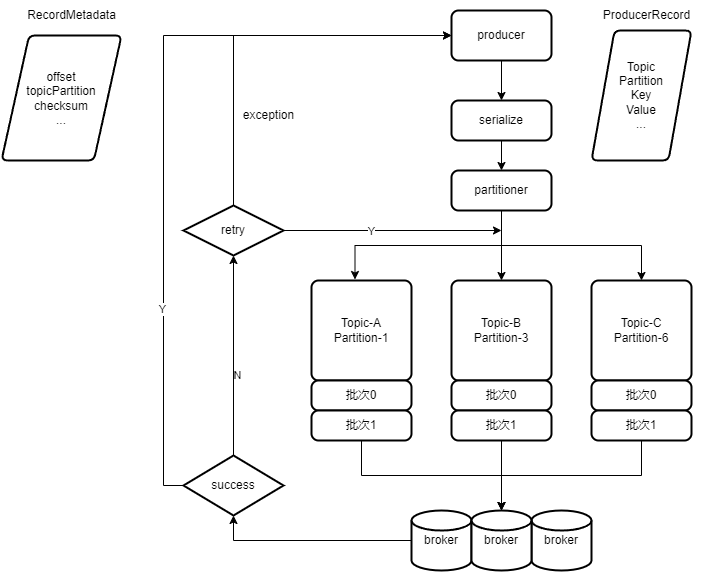
producer是线程安全的。producer是批量发送的。
消息传递保障
- 最多一次(0~1次)
- 至少一次(1~多次)
- 正好一次(有且仅有1次)
Consumer
Consumer API
-
创建
comsumerProperties properties = new Properties(); properties.setProperty(ConsumerConfig.BOOTSTRAP_SERVERS_CONFIG, "192.168.31.114:9092"); properties.setProperty(ConsumerConfig.GROUP_ID_CONFIG, "test"); properties.setProperty(ConsumerConfig.KEY_DESERIALIZER_CLASS_CONFIG, "org.apache.kafka.common.serialization.StringDeserializer"); properties.setProperty(ConsumerConfig.VALUE_DESERIALIZER_CLASS_CONFIG, "org.apache.kafka.common.serialization.StringDeserializer"); // enable.auto.commit 设置为 true,允许自动提交 properties.setProperty(ConsumerConfig.ENABLE_AUTO_COMMIT_CONFIG, "true"); properties.setProperty(ConsumerConfig.AUTO_COMMIT_INTERVAL_MS_CONFIG, "1000"); try (Consumer<String, String> consumer = new KafkaConsumer<>(properties)) { } -
使用
poll方法拉取数据,自动提交comsumer offset// properties.setProperty(ConsumerConfig.ENABLE_AUTO_COMMIT_CONFIG, "true"); // properties.setProperty(ConsumerConfig.AUTO_COMMIT_INTERVAL_MS_CONFIG, "1000"); clientConsumer.subscribe(Collections.singletonList(TOPIC_NAME)); while (true) { ConsumerRecords<String, String> consumerRecords = clientConsumer.poll(Duration.ofMillis(10000)); consumerRecords.forEach(System.out::println); } -
使用
poll方法拉取数据,手动提交consumer offset// properties.setProperty(ConsumerConfig.ENABLE_AUTO_COMMIT_CONFIG, "false"); clientConsumer.subscribe(Collections.singletonList(TOPIC_NAME)); while (true) { ConsumerRecords<String, String> consumerRecords = clientConsumer.poll(Duration.ofMillis(10000)); consumerRecords.forEach(System.out::println); clientConsumer.commitAsync(); } -
每个
partition的消息分别处理,分别提交consumer offsetconsumerClient.subscribe(Collections.singletonList(TOPIC_NAME)); while (true) { ConsumerRecords<String, String> consumerRecords = consumerClient.poll(Duration.ofMillis(10000)); // 按 partition 处理 for (TopicPartition topicPartition : consumerRecords.partitions()) { List<ConsumerRecord<String, String>> records = consumerRecords.records(topicPartition); if (!CollectionUtils.isEmpty(records)) { records.forEach(System.out::println); // 按 partition 提交 consumer offset long offset = records.get(records.size() - 1).offset(); consumerClient.commitSync(Collections.singletonMap(topicPartition, new OffsetAndMetadata(offset + 1))); } } } -
指定订阅
partition// 订阅指定partition TopicPartition topicPartition = new TopicPartition(TOPIC_NAME, 0); consumerClient.assign(Collections.singletonList(topicPartition)); ConsumerRecords<String, String> consumerRecords = consumerClient.poll(Duration.ofMillis(10000)); List<ConsumerRecord<String, String>> records = consumerRecords.records(topicPartition); records.forEach(System.out::println); // 按 partition 提交 consumer offset long offset = records.get(records.size() - 1).offset(); consumerClient.commitSync(Collections.singletonMap(topicPartition, new OffsetAndMetadata(offset + 1))); -
使用多个
consumer完成多线程处理int consumerSize = 2; ExecutorService executorService = Executors.newFixedThreadPool(consumerSize); for (int i = 0; i < consumerSize; i++) { int partition = i; executorService.execute(() -> consumer(consumerClient -> { TopicPartition topicPartition = new TopicPartition(TOPIC_NAME, partition); consumerClient.assign(Collections.singletonList(topicPartition)); ConsumerRecords<String, String> consumerRecords = consumerClient.poll(Duration.ofMillis(10000)); List<ConsumerRecord<String, String>> records = consumerRecords.records(topicPartition); records.forEach(r -> { System.out.println(Thread.currentThread().getName()); System.out.println(r); }); long offset = records.get(records.size() - 1).offset(); consumerClient.commitSync(Collections.singletonMap(topicPartition, new OffsetAndMetadata(offset + 1))); })); } -
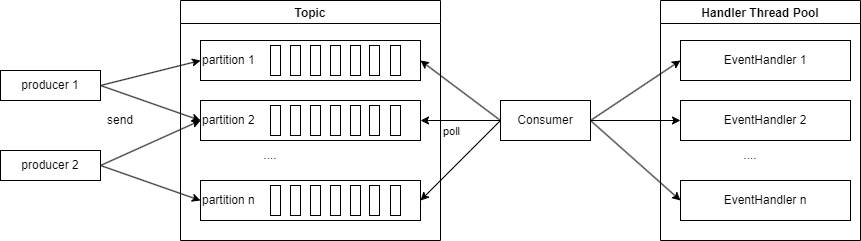
使用多个
eventHandler完成多线程consumer(consumerClient -> { ExecutorService executorService = Executors.newCachedThreadPool(); consumerClient.subscribe(Collections.singletonList(TOPIC_NAME)); ConsumerRecords<String, String> consumerRecords = consumerClient.poll(Duration.ofMillis(10000)); consumerRecords.forEach(r -> executorService.execute(() -> { System.out.println(Thread.currentThread().getName()); System.out.println(r); })); consumerClient.commitAsync(); }); -
指定
consumer offsetconsumer(consumerClient -> { // 订阅指定partition TopicPartition topicPartition = new TopicPartition(TOPIC_NAME, 0); consumerClient.seek(topicPartition, offset); });
Consumer基本概念
-
Consumer Group
- 单个
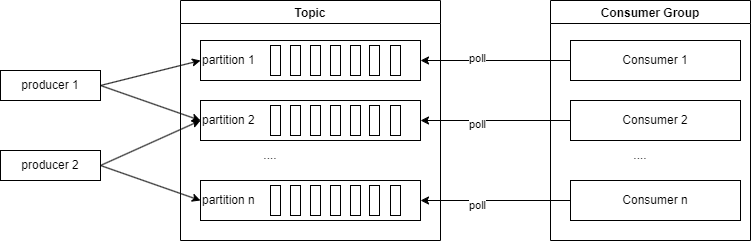
Partition的消息只能由ConsumerGroup中某个Consumer消费; Consumer从Partition中消费消息是顺序的,默认从头开始消费;- 单个
ConsumerGroup会消费所有Partition中的消息。
- 单个
Kafka Stream
Kafka Stream基本概念
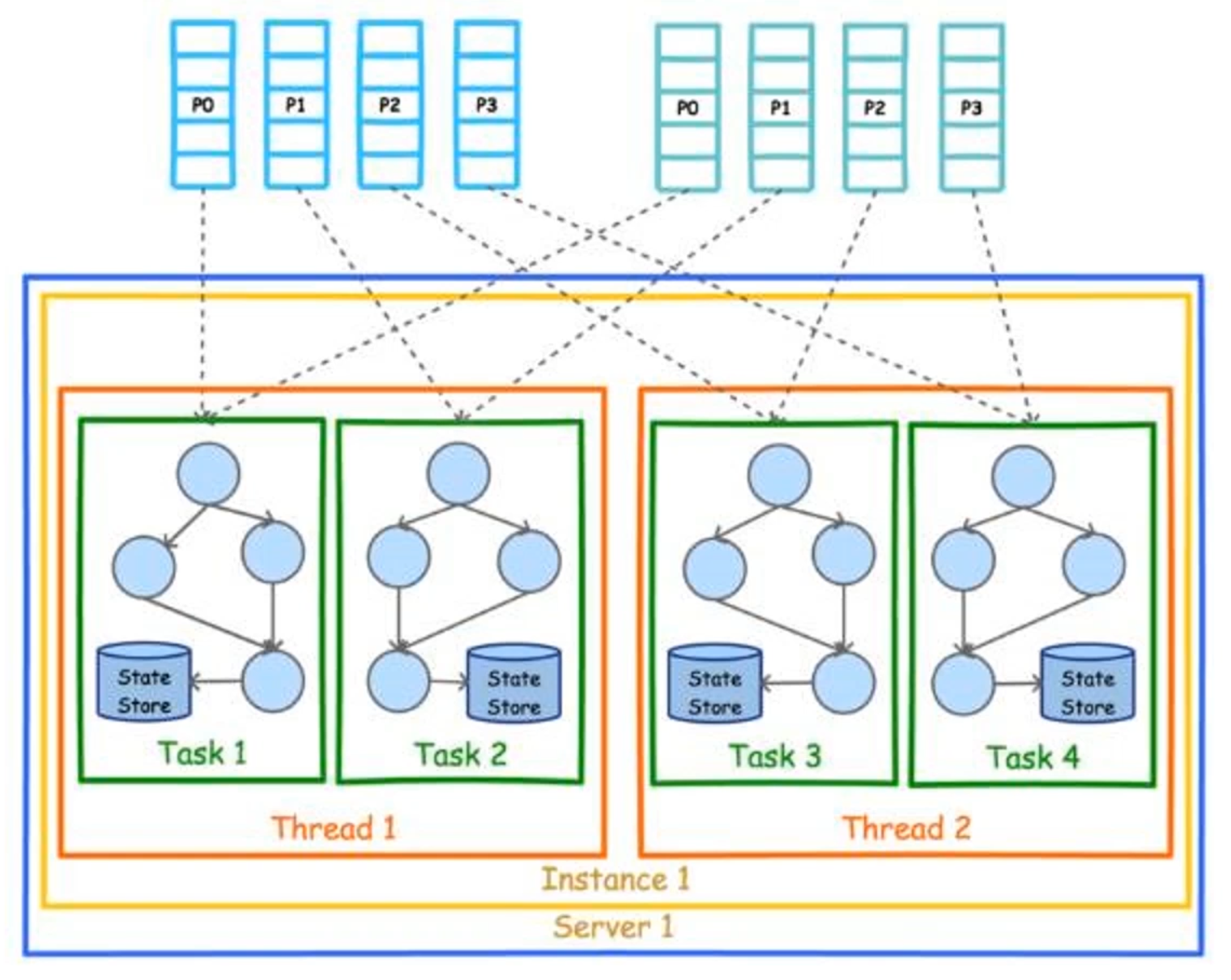
-
Kafka Stream是处理分析存储在Kafka数据的客户端程序库; -
Kafka Stream通过state store可以实现高效状态操作; -
支持原语
Processor和高层抽象DSL。 -
Kafka Stream关键词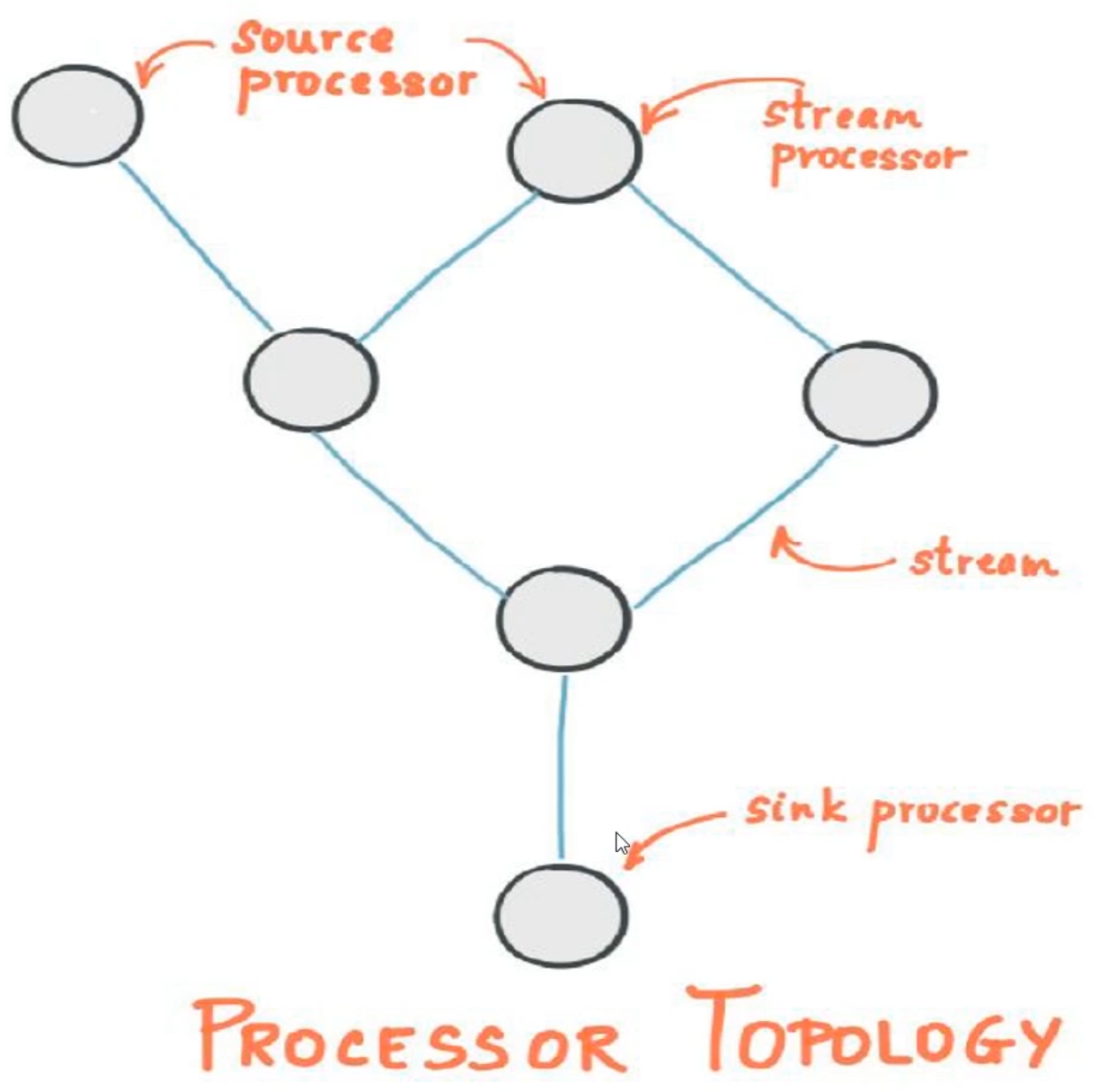
- 流及流处理器
- 流处理拓扑
- 源处理器及
Sink处理器
Word Count Stream
-
使用
Stream API构建一个Word Count程序定义两个
topic,向streams-plaintext-input发送消息,订阅streams-plaintext-output的消息private static final String STREAM_INPUT_TOPIC = "streams-plaintext-input"; private static final String STREAM_OUT_TOPIC = "streams-plaintext-output"; private static void createTopic() { AdminSample.adminClient(adminClient -> { NewTopic outputTopic = new NewTopic(STREAM_OUT_TOPIC, 1, (short) 1); NewTopic inputTopic = new NewTopic(STREAM_INPUT_TOPIC, 1, (short) 1); adminClient.createTopics(Arrays.asList(inputTopic, outputTopic)); }); }定义流计算过程
private static Topology wordCountStream() {
    StreamsBuilder builder = new StreamsBuilder();

    KStream<String, String> source = builder.stream(STREAM_INPUT_TOPIC);

    KTable<String, Long> count = source.flatMapValues(value -> Arrays.asList(value.toLowerCase(Locale.getDefault()).split(" ")))
            .groupBy((key, value) -> value)
            .count();

    count.toStream().to(STREAM_OUT_TOPIC, Produced.with(Serdes.String(), Serdes.Long()));

    return builder.build();
}
创建
KafkaStreams实例createTopic(); CountDownLatch latch = new CountDownLatch(1); Properties properties = new Properties(); properties.setProperty(StreamsConfig.BOOTSTRAP_SERVERS_CONFIG, "192.168.31.114:9092"); properties.setProperty(StreamsConfig.APPLICATION_ID_CONFIG, "wordCountApp"); properties.put(StreamsConfig.DEFAULT_KEY_SERDE_CLASS_CONFIG, Serdes.StringSerde.class); properties.put(StreamsConfig.DEFAULT_VALUE_SERDE_CLASS_CONFIG, Serdes.StringSerde.class); properties.put(StreamsConfig.CACHE_MAX_BYTES_BUFFERING_CONFIG, 0); properties.put(ConsumerConfig.AUTO_OFFSET_RESET_CONFIG, "earliest"); try (KafkaStreams streams = new KafkaStreams(wordCountStream(), properties)) { streams.start(); latch.await(); }
Connect API
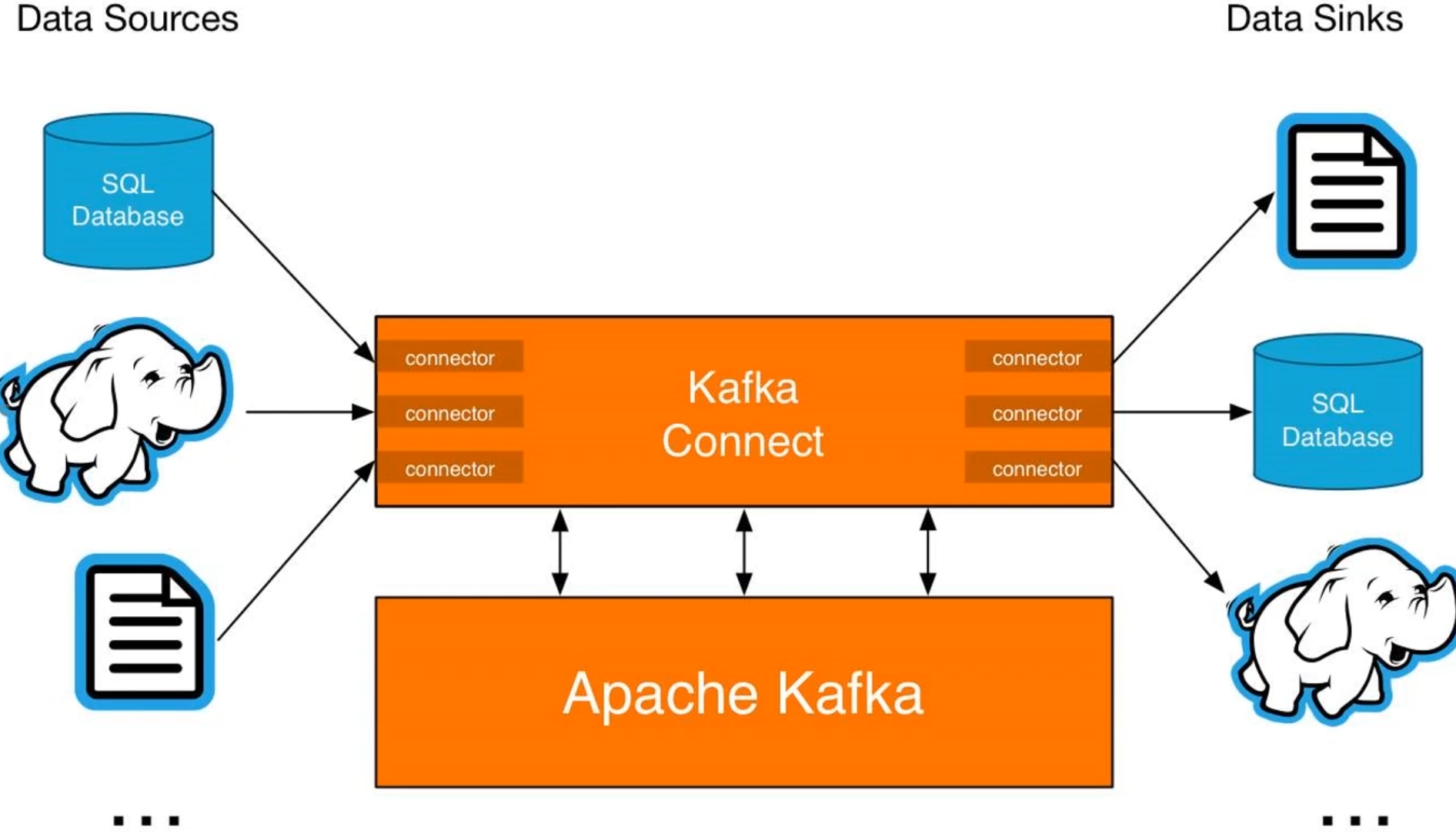
Kafka Connect是Kafka流式计算的一部分;Kafka Connect主要用来与其它中间件建立流式通道;Kafka Connect支持流式和批处理集成。
Kafka集群
Kafka集群部署
-
Kafka天然支持集群; -
Kafka集群依赖于Zookeeper进行协调; -
Kafka主要通过brokerId区分不同节点。
通过修改server.properties配置创建3个节点的伪集群
# broker1
broker.id=0
listeners=PLAINTEXT://192.168.31.114:9092
dvertised.listeners=PLAINTEXT://192.168.31.114:9092
log.dirs=/tmp/kafka-logs0

# broker2
broker.id=1
listeners=PLAINTEXT://192.168.31.114:9093
dvertised.listeners=PLAINTEXT://192.168.31.114:9093
log.dirs=/tmp/kafka-logs1

# broker3
broker.id=2
listeners=PLAINTEXT://192.168.31.114:9094
dvertised.listeners=PLAINTEXT://192.168.31.114:9094
log.dirs=/tmp/kafka-logs2
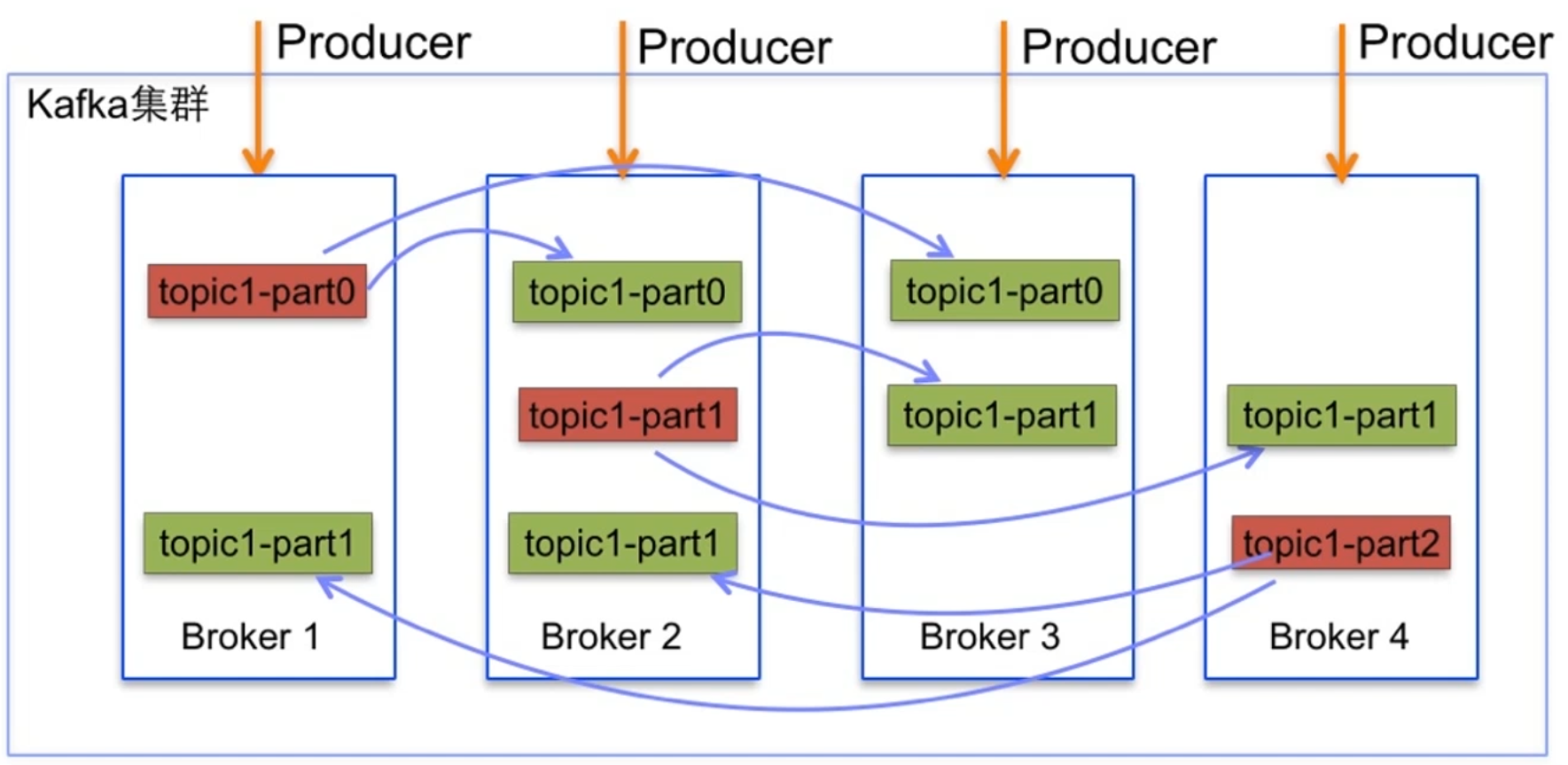
Kafka副本集
-
Kafka副本集是指将日志复制多份; -
Kafka可以为每个Topic设置副本集; -
Kafka可以通过配置设置默认副本集数量。
创建partition为3,replicationFactor为2的Topic
  NewTopic newTopic = new NewTopic(TOPIC_NAME, 3, (short) 2);
  adminClient.createTopics(Collections.singletonList(newTopic));
Kafka核心概念
-
Broker:一般指Kafka的部署节点; -
Leader:用于处理消息的接收和消费等请求; -
Follower:主要用于备份消息数据。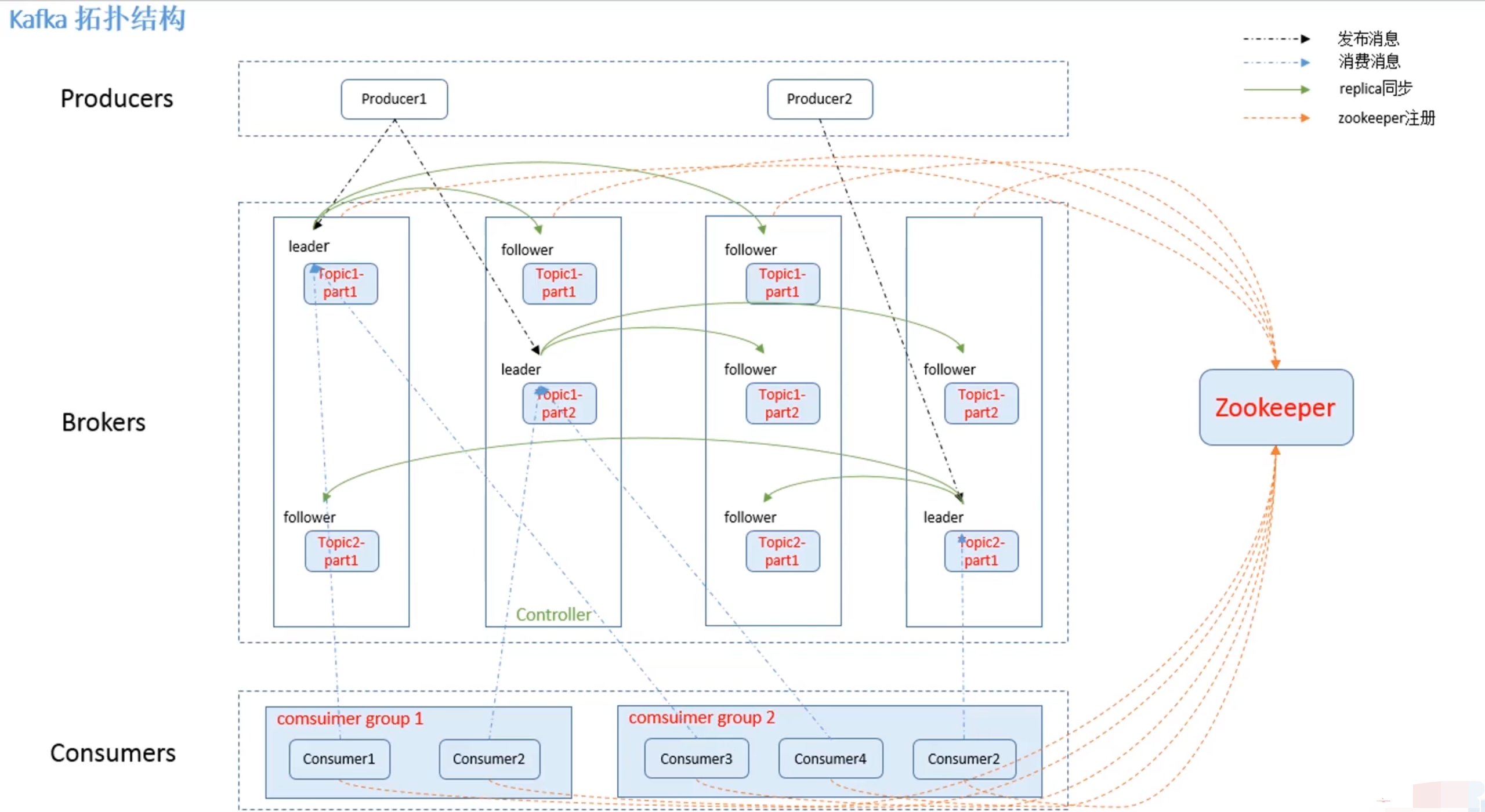
Kafka节点故障
Kafka与Zookeeper心跳未保持视为节点故障;follower消息落后leader太多也视为节点故障;Kafka会对故障节点进行移除。
Kafka节点故障处理
Kafka基本不会因为节点故障而丢失数据;Kafka的语义担保acks也很大程度上避免数据丢失;Kafka会对消息进行集群内平衡,减少消息在某些节点热度过高。
Leader选取
Kafka没有采用多数投票来选举Leader;Kafka会动态维护一组Leader数据的副本(ISR);Kafka会在ISR中选择一个速度比较快的设为Leader。
Kafka监控
Kafka概念
Kafka常见应用场景
- 日志收集或流式系统;
- 消息系统;
- 用户活动跟踪或运营指标监控;
Kafka吞吐量大的原因
- 日志顺序读写和快速检索;
Partition机制;- 批量发送接收及数据压缩机制;
- 通过
sendfile实现零拷贝原则;
Kafka日志
日志结构
Kafka的日志是以Partition为单位进行保存的;- 日志目录格式为
Topic名称+数字; - 日志文件格式是一个“日志条目”序列;
- 每条日志消息由4字节整形和N字节消息组成;
- message length : 4 bytes (value : 1+4+n)
- “magic” value : 1 byte
- CRC : 4 bytes
- payload : n bytes
日志存储与分段
- 每个
Partition的日志会分为N个大小相等的segment中; - 每个
segment中消息数量不一定相等; - 每个
Partition只支持顺序读写; Partition会将消息添加到最后一个segmaent上;- 当
segment达到一定阈值后会flush到磁盘; segment文件分为两个部分:index和data;
日志读取操作
- 首先需要在存储数据中找出
segment文件; - 通过全局
offset计算出segment中的offset; - 通过
index中的offset寻找具体数据内容;
Kafka零拷贝
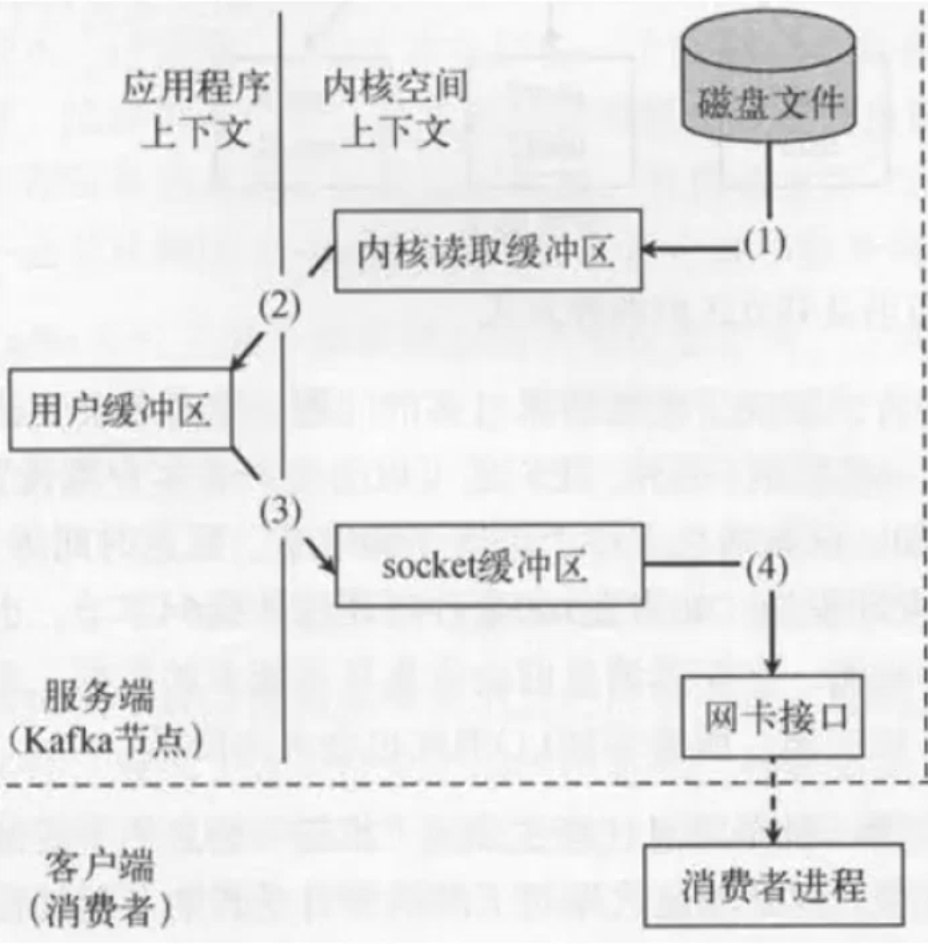
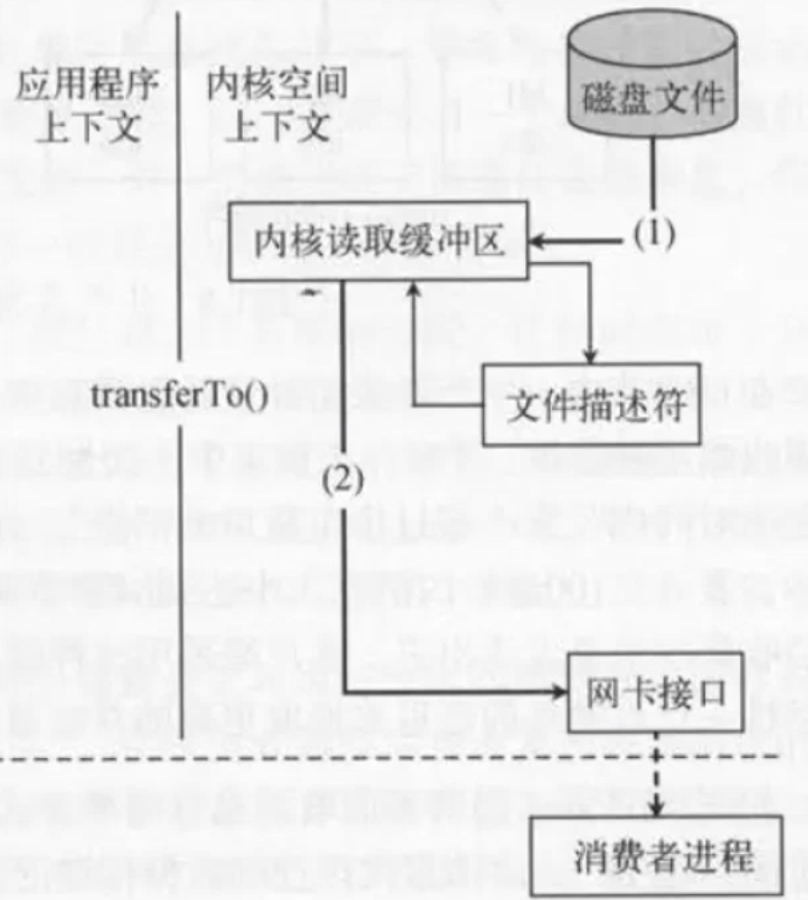
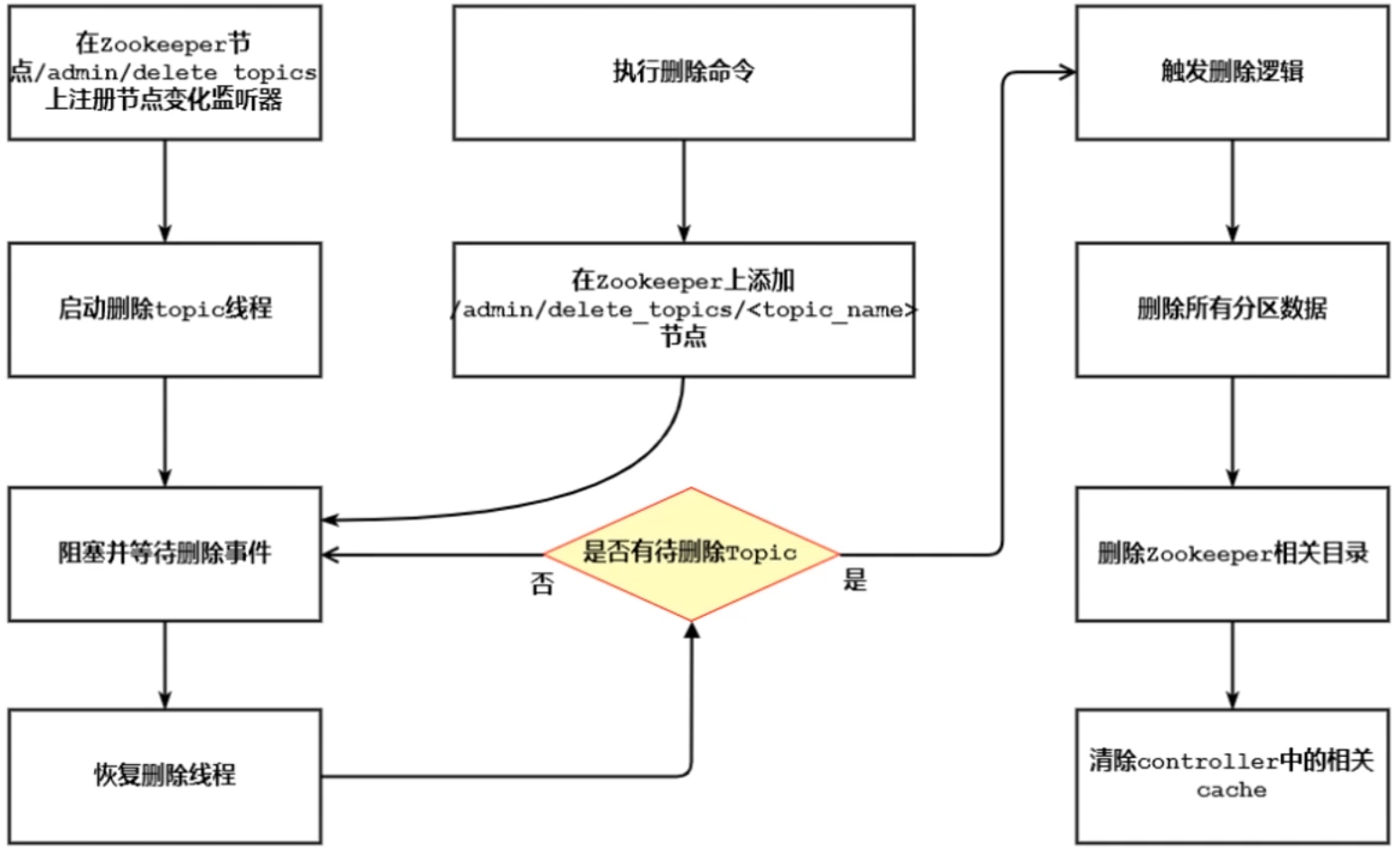
Kafka删除Topic的流程